Monday, 27 June 2011

Filler posts? Who, me?

I've been out all weekend filming (more over the next month - and no spoilers I'm afraid) so I haven't had much time to work on the engine or any other projects - though I have ordered the motor, charger and batteries for the quadrotor. The work I have done towards the game is mostly non-visual (i.e. importing 3D models, materials, user input, and animating colour transitions). I'll be finishing the model and material importer, and designing the renderer properly over the next couple of weeks.

CryTek know how to do lighting.

Once model importing is sorted (not too far off) the next big problem will be lighting. Lighting is easy in certain situations but next to impossible in others. Take the above image as an example (a model of Sponza Atrium, rendered in CryEngine 3). If you consider light as moving only in a straight line, then any covered areas would be completely dark. We know from experience that this is not the case, however - light is bounced off all surfaces, providing light to the covered areas. This is known as radiosity. Games like Half Life 2 pre-compute the radiosity but this method has limitations (most notably, the lighting is only valid when the sun is in one position) so increasingly games have started to handle more advanced lighting in real-time. There's still no "standard model" to speak of as yet - though there are some techniques in common between virtually all games. Advanced illumination like this won't be relevant in an RTS game, but I prefer to plan ahead and think about how features could be incorporated. 

Project size to date: 384mb
Charlie

Monday, 20 June 2011

Progress. Kind of.


I do Linux. It's a thing now.
This is going to be another short post, I'm afraid. Current progress towards the game is shown above - I've set it up to do real-time colour toning of scenes. It's currently just set to turn Red and Green down a lot, and Blue down slightly, and then switch the Red and Blue channels around (fixing the odd colouring issue I was having at the time of last week's post).  It's also rendering to an off-screen buffer at the same time - which means that the in-game content could all be treated in the same way, not just a raw image as shown here.

For anyone interested, the fragment shader code itself is shown. It really isn't that bad, actually. The code that goes with it (feeding it the data points, textures, etc) is horrific at first sight though. Finer-grain control over colours will be possible, when I write some code to handle one-dimensional textures (multiplying by 0.9, 0,7 and 0.6 were really just to test the concept).

The switch to Linux is an interesting one - I had previously done so on my laptop whilst "revising" - but now it's on my desktop, and it's permanent. On the whole I love the OS - everything is free, without any hassle - installing programs is as easy as typing its name, and pressing "Install". Programming is far easier than under Windows - the entire O/S feels more geared towards it. Even advanced changes only require a couple of lines of text. I'll only cave in and install Windows 7 when my craving to play Portal 2 gets too great, or when I discover that there's no fix for a bug I have with it. (The choice to use a Portal-related texture as my test image suggests I'm not going to last too long...) The only real barriers against wide adoption is the lack of apps like Photoshop, After Effects, and a large library of decent games, the perceived increase in complexity (no steeper than Windows - just not what people are used to), and maybe the self-imposed "free software" barriers (again, not a problem to me - technically formats like MP3 and DVD are licensed, and drivers without source code available throw up a "non-free" warning). That's how my experience of it as my "Main O/S" has been, anyway.

Linux is the one responsible for destroying the performance - it's not actually that slow.
Charlie

Monday, 13 June 2011

Shaders Aren't Easy

What I've done there is failed. 
I'm afraid there isn't going to be a substantial post today - I'm just going to show what little progress I've actually made on an "engine" (term used loosely) - my code can import a texture and show it on a slightly-mutated ex-square. Colours are a work in progress, and it's also using a complete hack to set the texture coordinates, but I think it shows that I'm not far off doing "useful" things in OpenGL. It's not going to win any awards for pretty code (once I have model importing, basic illumination and muti-texturing sorted, I can start writing pretty, fast and flexible stuff), but it's all practice and experience in the graphics language.

The texture on the right is the original, the two on the left are various attempts (guesses) at the right colour profile.

I've managed to keep the performance, at least...


"Failure is just delayed success". Is what failures say.
Charlie

Monday, 6 June 2011

5000 FPS. Like a boss.

(Yes, the Physics exam is in 10 hours.)
I didn't manage to hit 9001 FPS, and admittedly it's only 2 polygons, but pretty cool anyway...

I'm just going to leave that here as a little teaser of what's to come. That's actually a very basic shader program - which means it's running on my graphics card and not CPU. In non-technical terms, that means that you get much more speed on modern hardware, and a huge amount of flexibility, at the cost of a bit of complexity. Shaders in modern games control pretty much everything you see, in some way or another - from lighting to the position of objects.

This is only the start, but in the relatively near future, this will become a more full-featured game engine - is anyone interested in helping create a "complete" game, beyond who I've already spoken to? You don't have to be technically minded - there's a huge amount of non-technical work involved in actually creating a decent game - the more hands, the merrier. There may well be a Facebook group in the near future. I have some ideas, as do several other people. RTS/FPS/3PP are all possibilities - it depends on what people would like to do. In fact, some might be useful as miniature test projects, as the code/collaboration improves.

I'm clearly not Chuck Norris
Charlie

Monday, 30 May 2011

The Maths Behind Computer Games: Rendering

I wanted to do something a little different with this post - and it'll probably get fairly technical, but it'll hopefully be interesting nonetheless. I've been fascinated with the maths and engineering behind games for almost as long as I can remember, and thought it might be interesting to condense some of that into a post (with pretty pictures) - if it's interesting I might do some more of these in the future. For now I'm going to explain the process of projection, with maybe a dash of texturing and lighting - there are actually some short-cuts and tricks used to speed the process up, but I'm mostly ignoring them for simplicity.

How it Works
One of the fundamental and vital things about drawing a 3D scene, is that almost everything can be approximated as a load of small, flat pieces (polygons) each joined at the edges, with a visible material applied to them. Computers generally use triangles, but you can also use quads or any n-gons if you feel so inclined. Each of the points which define the triangles can be expressed as a vector - 3 numbers, representing its X, Y and Z coordinates in space.
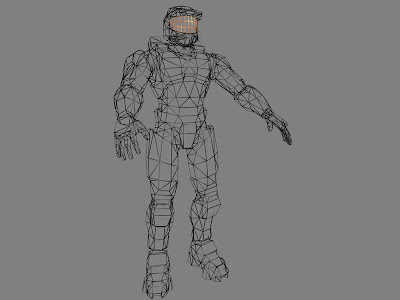
Mostly triangles in there...
Using some pretty self-explanatory maths, you can take a set of several different models, each positioned at different points in the world, and express them as a set of points (vertices) in the scene. So you now have a set of points in space. So what? They are pretty much useless, without some kind of viewing-point. The position and location of a camera in the world can also be expressed as a set of coordinates and a rotation - by using these bits of information, every point in the world can be shifted into a nice, simple set of values which are now oriented with respect to the camera - that is, the axes are aligned to the view-point and not the world or the objects. If you're confused, don't worry too much - essentially, what you now have is the points, but shifted so that the numbers now represent X, Y and Depth rather than the position in the world.

Unfortunately, our view on the world isn't quite as simple as this - if you imagine a simple cube, as described above, as seen face-on, each corner would be directly in front or behind of the rear face. In reality as we experience it, things which are further away appear smaller, so we shift points towards the centre of the screen depending on how deep they are. This now gives a pretty nice view of where each point on the model corresponds to on the screen - you can say that each point has been projected onto the 2D screen.
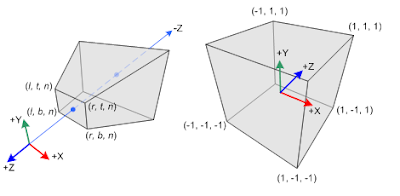
The above diagrams represent perspective and orthographic space (perspective is on the left) - the space which is actually seen by the camera (the far end is the furthest object you can see - computer games limit how far you can look into the distance, sometimes with sneaky tricks)
The initial projection I described is what's known as orthographic projection, which is useful if you need to work to a specific scale - for example, when designing a product with CAD. The depth-adjusted version is perspective projection, and is used when something needs to be displayed as it would be seen.

Once you have your points as they would be positioned on the screen, you can then draw in the triangles themselves. The easiest way would be to stretch a texture onto each triangle - though even this can have some quirks, which fall way beyond the scope of this blog post. A much more interesting and mathematical thing you can do is break each triangle into pixels and work out the colour of each - this is known as shading and can be done incredibly fast on modern graphics hardware.

All credit to Wikipedia for the image.

The Phong model of lighting (named after the first person to describe it, Bui Tuong Phong) can be used to shade a variety of material types very effectively - it's typically used for plastics or non-transparent liquids - Gels in Portal 2 for example. The principle is that the overall light reflected from a surface can be thought of as the sum of several different components, each of which is seen above.

The ambient (emissive) light is a term considered to always exist, but is often excluded because it is not strictly necessary. The diffuse (scattered) light is reflected in all roughly all directions by the material and does not depend on the viewing direction, only on the lighting direction. The specular (highlight) light is the intense highlight reflection you may see off shiny surfaces. Together, they can be summed up to give a pretty good representation of a material as a whole.

Restrain yourself, Jamie!
The Ka, Kd, Ks and alpha are material constants - representing the material's ambient, diffuse, specular and "shininess" constants. Things with a hat on (^)  are normalised vectors representing light and viewing directions, and the surface's normal. Ip is the output - the colour of a single pixel. This process is repeated for every single pixel of a scene (well, technically fragment - transparency can cause two or more fragments to be drawn for a single pixel).
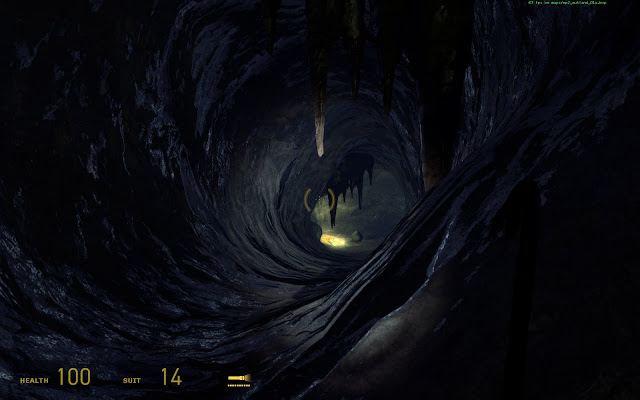
Not personally a fan of the cave missions, but they definitely looked good. 
Of course, there are a huge number of other things you can (and indeed need to) do to make a realistic-looking scene which still performs well. For example, textures can be sampled to give much finer detail on items, and other shaders can be custom-written to handle reflective, refractive or translucent materials, metals, goo, or even supposedly simple things such as bumpy surfaces, as seen above. The cave's surfaces are actually flat - the surface shader is given a bump-map - a texture representing the height of a material rather than its colour. This can be used with a light vector (such as the torch) to give gorgeous, realistic-looking lighting effects, at much faster speeds.

Confused? Now remember that the computer handles about 100,000 vertices, depending on the game, and 1,000,000 pixels, 50 times a second, just in graphics calculations for a modern game.

Things I Haven't Mentioned
What about the other side of objects?
Sneaky trick with how you choose the triangles - you number the vertices in an anti-clockwise order around each polygon. When you're about to draw it, check if the order is still anticlockwise. If it is, you know it's facing you  and should be drawn. If not, you're either looking at it sideways-on or from behind - which probably means you shouldn't be drawing it.


What about things behind you?
In the part where you move things with respect to the camera, things behind you end up getting a different sign on the depth to everything in front of you. You can just throw out any vertices with depth values below zero.


Anything else?
There's probably a solution or an explanation, but I'm really not going to pre-empt anything and everything you could ask. Ask in the comments, or wait for future installments, if this was actually interesting.


Yours geekily,
Charlie

Monday, 23 May 2011

What's eating your time?

Despite having disassembled my main desktop, I've found that I still have ample distraction even on a Linux laptop - so I decided to present, in list form, the top 5 web-apps I use to distract myself:

5. Webmasters Tools/Analytics/AWS Control Panel
All are just small apps you can use to check the status of a site or sites and how they are performing - useful tools for analysing your sites. Not so useful to check every half-hour though, since the data is updated daily.

4. Whatever tab is to the left of this one
This rule sadly also applies - instead of concentrating on the contents of one tab, if one starts to lose its appeal, the one to its left starts to look all the more tempting. If I happen to be on the left-most tab then.... yeah, right - like I'd ever make it over there. The tabs on the left haven't seen the light of day since the machine was last booted

3. Grooveshark
Finding new music is easy. Concentrating with said music playing is often harder.

2. YouTube:
With awesomeness like that throwing itself at you, what's not to like?

1. Facebook
This one doesn't need any explanation.

(Twitter, Reader, and a few other sites also feature but less prominently)

There's an entry on the XKCD blog that looks at the procrastination response, which is surprisingly interesting. Essentially, in the absence of a clear way forward in solving a problem, the brain will throw out the potential longer-term satisfaction of solving the problem, for the shorter-term reward gained by, for example, opening up a new tab and browsing Facebook. The new action, as long as it has some novelty value, will almost always be more appealing, because it provides an instant and always-available reward. Hence, over time, more challenging things are pushed aside by the short-term rewards of a quickly-changing social site such as Facebook, which never loses its novelty value because of its continually-current nature. Similarly, sites like Twitter and YouTube can also become ingrained responses when faced with the slightest of problems in your intended work.

As for solving the above? If I find a solution in time for my Chemistry exam, it'll both save me from an embarrassing and complete failure, and will be shared on here next time.

Number of times I alt-tabbed to another window whilst writing this: 6
Charlie

Monday, 16 May 2011

Pre-exam Jelly

If you hadn't noticed, exams are now altogether too close for comfort. For that reason, I should probably be asleep rather than blogging. This week is Maths, but Chemistry is still only a week and a half away. A week is long enough to learn most of the unit - at least, that's what I'm depending upon...

In lieu of a proper post, I leave you with these tidbits:

My desktop is now literally a desktop computer - it's lying in several pieces on my desk (intentionally so, it didn't explode or anything). If you want to contact me, I can no longer read MSN or Steam messages. Send messages via FB, email or text instead, please.

Without a desktop, I've been on my laptop for far too long, and am far too used to Linux as a result. Expect to see some cool stuff over the summer as a result (if by "cool" you read "slightly more geeky than a conference of WoW enthusiasts"). I now know my "top" from my "tee", and "-X" from "-x" - the latter was the source of much confusion...

Chell in the Rain (now my background image)

A light distraction:


Contenders for the comparison included "geekier than a Maths set with their own Facebook group" and "geekier than someone fluent in both JavaScript and Klingon"
Charlie